Open app.protrack.xyz in Chrome, add it to your home screen, then go to Settings → Receipt printer and pick a route: Bluetooth, RawBT app, USB, Serial port or Print dialog. Tap Pair printer, then Test print. Switch on Print after Charge and every paid bill prints by itself. On iPhone, use the Print dialog route.
Why skip heavy POS software
- No install, no updates to manage. The browser loads the latest version.
- Works on the phone already at the counter, plus any tablet or laptop, with the same login.
- Light on data. ProTrack is tuned to stay quick on a slow 1.6 Mbps mobile connection, and printing happens on the device itself, with no upload.
- Free for one shop. No licence fee for billing or printing.
Which route fits your printer and device
ProTrack only shows the routes your current browser can use.
| Route | For which printer | Works in |
|---|---|---|
| Bluetooth | Bluetooth LE (BLE, 4.0) printers | Chrome and Edge on Android, Windows, macOS, Linux, ChromeOS |
| RawBT app | Classic Bluetooth (SPP) printers | Android only, with the free RawBT app |
| USB | USB printers | Desktop Chrome and Edge; Android Chrome with a USB OTG cable (Windows needs a one-time WinUSB driver step) |
| Serial port | Serial or USB-serial (COM port) printers | Desktop Chrome and Edge only |
| Print dialog | Any printer the device already knows | Every browser; the only route on iPhone and iPad |
Step by step
Open ProTrack in the browser
Go to app.protrack.xyz in Chrome or Edge and sign in with Google. Add a few products if you have not yet.
Add it to the home screen
In Chrome's menu (⋮) tap Add to home screen or Install app. ProTrack then opens full screen from its own icon. On iPhone, use Safari's Share button and Add to Home Screen.
Choose paper width and route
Open Settings → Receipt printer. Pick 58 mm or 80 mm to match the roll, then the route from the table above.
Pair and test
Tap Pair printer and pick your printer from the browser's list (it must be a tap; browsers never open this list on their own). Then tap Test print and check the ₹ sign, the Tamil item name and the QR code.
Switch on automatic printing
Turn on Print after Charge to print every paid sale. If you use the live queue, turn on Print a token slip when a customer joins the queue so walk-ins you add get a slip with a QR to follow their turn.
Getting the print dialog right (iPhone, Windows printers)
The Print dialog route uses the browser's normal printing, so it works with any printer the device knows, including AirPrint printers on iPhone. ProTrack sets the page to the bill's width and length, but not every browser or driver follows that. If the bill comes out with margins, cut off, or on a long blank page, set this once in the dialog:
- Paper size: 58 mm (or 80 mm)
- Margins: None
- Scale: 100%
- Headers and footers: off
Chrome remembers these for that printer. Paper feed and cutting on this route follow the printer driver.
What prints
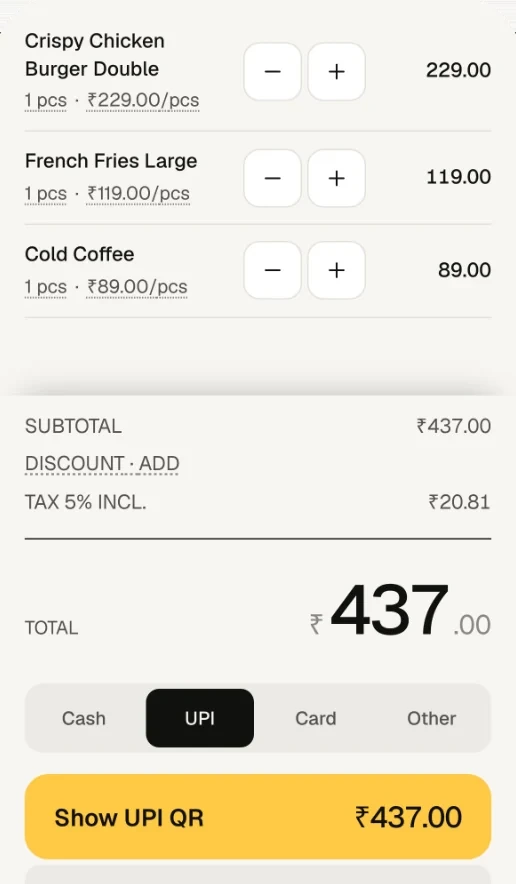
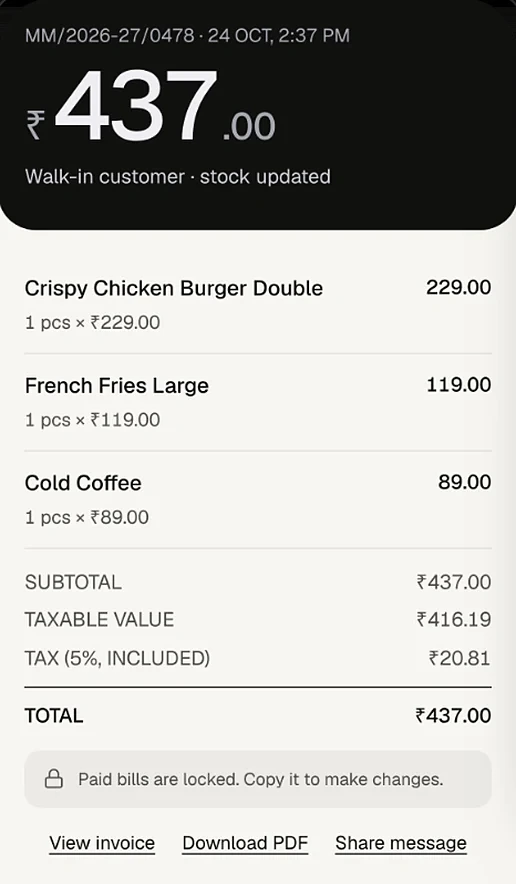
- Bills from the billing screen, automatically after Charge or with the Receipt button.
- Any invoice, from its Share menu with Print receipt. An unpaid bill carries a UPI QR for its exact amount.
- Queue token slips for walk-ins you add on the queue board, with a QR the customer scans to watch their turn.
Because the slip is drawn as an image, Tamil item names and the ₹ sign print correctly on printers whose built-in fonts lack them. ProTrack does not open a cash drawer or print a logo on the slip, and prints one copy at a time.
Need a printer first? See 58 mm vs 80 mm: which to buy.
Frequently asked questions
Can a website really print to a thermal printer?
Yes. Chrome and Edge support Web Bluetooth, Web USB and Web Serial, which let a page you trust talk to a printer you pick. ProTrack uses these to send standard ESC/POS commands. Every browser can also print through the normal print dialog.
Do I need to install anything?
No app store install. You can add ProTrack to the home screen from the browser so it opens like an app. Only Classic Bluetooth printers on Android need the free RawBT app as a bridge.
How do I print receipts from an iPhone?
Safari on iPhone and iPad has no Web Bluetooth or Web USB, so ProTrack uses the Print dialog route there, with AirPrint or the printer maker's own print app.
My bill prints with margins or a long blank page. What do I change?
On the Print dialog route, set it once in the dialog: paper size 58 mm (or 80 mm), margins None, scale 100%, headers and footers off. Chrome remembers this for that printer.
Will printing be slow on a weak mobile connection?
No. The receipt is drawn and sent to the printer on your own device, with no trip to the server, so a slow connection does not slow the print. A short bill takes about a second.
What happens if the print fails during a sale?
The sale is already saved. ProTrack shows the reason with a Retry button, and you can reprint later from the invoice.
Try it on your own counter
ProTrack is free for one shop. Sign in with Google, add a few products and make your first bill today. Nothing to install from an app store.