Give customers your own order link, app.protrack.xyz/s/your-shop, instead of listing on a delivery app. They pick items from your real price list, choose pickup or delivery, and the order lands in the Orders tab of ProTrack with their name, phone and address. You confirm on call or WhatsApp, tap Create invoice, deliver it yourself and collect cash or UPI. There is no commission because the money never passes through anyone else.
The problem with orders in a WhatsApp chat
WhatsApp is how most neighbourhood shops already take orders, and that is fine for talking. It breaks down for the order itself:
| Order typed in a chat | Order from your link | |
|---|---|---|
| Items | "1 rice, oil, the usual biscuits": which brand, which size? | Exact product and size from your list |
| Price | You work it out and type it back | Your current price, totalled for the customer before they order |
| Address and phone | Scrolled past, in another message | On the order, with one-tap call and WhatsApp |
| Busy evening | Orders buried under forwards and voice notes | A pending list with a count, oldest to newest |
| Bill | Typed again into a billing app, or not at all | One tap to a numbered invoice |
Delivery aggregator apps solve the structure but charge for it: commission and fees on every order can take a large share of a grocery shop's thin margin, and the customer relationship belongs to the app. Your own link gives you the structure and keeps the customer yours.
Step by step
Publish your store link
Sign in at app.protrack.xyz and add the products you sell, with sizes (1 kg, 5 kg) and prices. Loose items like rice or dal can be sold by kg. In Settings → Customize your store, turn on Pickup and/or Delivery, add a delivery note and minimum order, then Publish and switch on Online store open. The full setup is in setting up your free ordering link.
Share the link where customers already are
- WhatsApp Business: add the link to your profile, post it on status, and send it to your broadcast list with this week's offers.
- Google Business Profile: add it as your website or order link, so people searching "provision store near me" can order straight away.
- The counter: use Share store → Print a poster for an A5 Scan to order poster beside your UPI sticker.
Reply to chat orders with the link
When someone types a long list into the chat, reply with the link: "Please order here, prices and sizes are listed: app.protrack.xyz/s/your-shop". Regular customers switch within a few orders, because they can see the total before they send it.
Check new orders in the Orders tab
Every order shows the customer's name, phone, Pickup or Delivery, the address, their note and the items. Tap the phone icon to call or the WhatsApp icon to message them, for example to confirm a substitute brand.
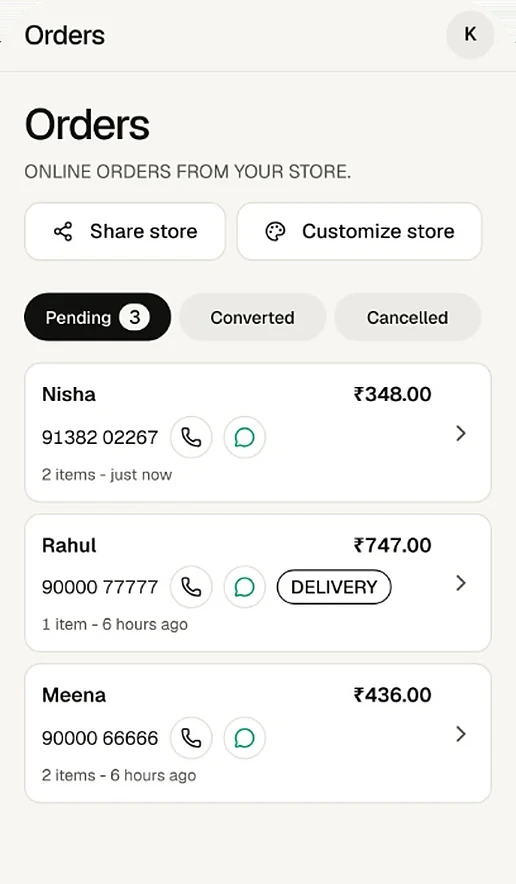
Pending online orders, each marked pickup or delivery. Turn the order into a bill
Tap Create invoice. ProTrack first flags items whose price changed, items no longer for sale and items short on stock. Choose The customer's prices or Today's saved prices, then Mark paid (stock comes down now) or Save as unpaid (for customers who pay at month end). The customer's order page changes to confirmed.
Deliver and collect payment
Pack and deliver, or keep it ready for pickup. Collect cash or UPI; the invoice can show a UPI QR for the exact amount. Share the invoice as a PDF on WhatsApp, or print the receipt on a thermal printer.
Why the totals are always right
The browser never decides the price. When the customer views the cart, places the order, and again when you create the invoice, ProTrack recalculates every line on the server from your saved prices, in whole paise. If your price changed while the customer was ordering, they see what changed and confirm again before the order is placed.
Frequently asked questions
Does ProTrack charge a commission on online orders?
No. ProTrack is free for one shop and takes nothing from your orders. Customers pay you directly, by cash or UPI, at pickup or delivery.
Can customers pay online when they order?
No. ProTrack does not collect payments. The checkout tells the customer they pay the shop directly. When you make the bill, it can carry a UPI QR for the exact amount, which the customer scans at the door or from the shared PDF.
Does ProTrack deliver the order?
No. You deliver with your own staff, or the customer picks up. You decide whether to offer delivery, write a delivery note such as your area and timing, and set a minimum order for delivery.
What if my prices change after the customer ordered?
When you create the invoice, ProTrack shows items whose price changed and lets you charge either the customer's prices or today's saved prices. All totals are worked out again on the server, so the bill is never wrong by a paisa.
Can I still take orders on WhatsApp?
Yes. WhatsApp stays your chat with customers: you can WhatsApp any customer from the order in one tap, and customers can send their placed order to you on WhatsApp from their order page. The link just keeps the list, prices and address in one place.
What stops fake or spam orders?
Orders pass a bot check, the same phone can place at most 5 orders an hour, and you can cancel any order. The customer sees the cancellation on their order page.
Try it on your own counter
ProTrack is free for one shop. Sign in with Google, add a few products and make your first bill today. Nothing to install from an app store.